

When sending emails from Salesforce Flow, you can use an Organization-Wide Email Address as the sender. Although Organization-Wide Email Addresses configured for User Selection appear in the list of available options, the Default No-Reply Address doesn't appear in the list.
You might think that you need to change the purpose of the Org-Wide Email Address to make it available in Flow. However, that's not necessary. Fortunately, there is a workaround that allows you to use the existing Default No-Reply Address without changing its configuration.
Let's see how it works.
Why Is the Default No-Reply Address Missing in Salesforce Flow?
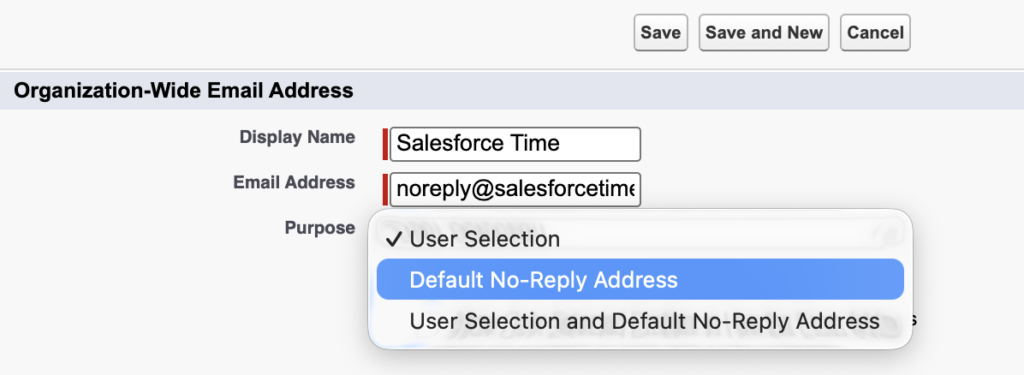
In Salesforce, you can configure Organization-Wide Email Addresses with different purposes:
- User Selection: Allows users with the appropriate permissions to select the email address when sending emails.
- Default No-Reply Address: Used for certain automated system notifications, such as case-related emails.
- User Selection and Default No-Reply Address: Makes the address available for both purposes.
When configuring the Send Email action in Salesforce Flow, you can set the Sender Type to OrgWideEmailAddress and choose an address from the available options.
However, if your Org-Wide Email Address is configured exclusively as Default No-Reply Address, it won't appear in the available options.
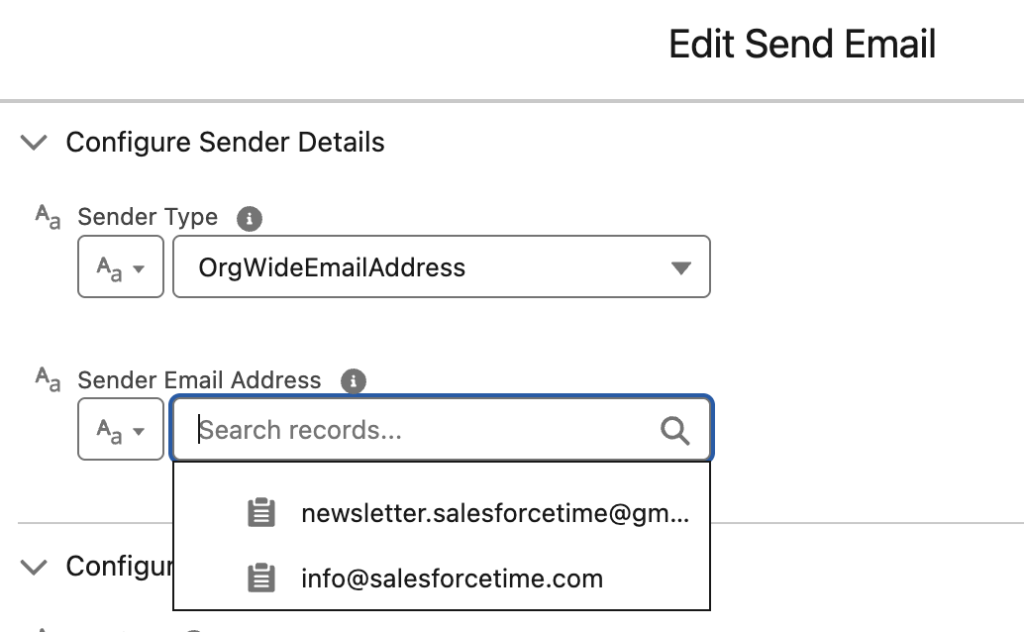
Salesforce intentionally restricts user selection of addresses configured for this special purpose.
One possible solution is to change the purpose to User Selection and Default No-Reply Address. But what if you want to keep the existing configuration?
How to Use the Default No-Reply Address in Salesforce Flow
The solution is surprisingly simple: Instead of selecting the email address from the dropdown, enter it manually.
Follow these steps:
- Add an Action element.
- Search for and select Send Email.
- Configure the recipients and email content.
- Under the sender configuration, set Sender Type to OrgWideEmailAddress.
- In Sender Email Address, instead of selecting an address from the available list, manually enter your Default No-Reply Address.
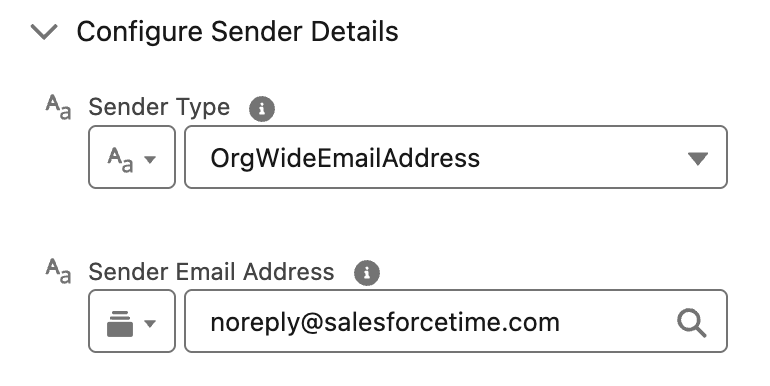
Alternatively, you can create a Text resource containing the email address and use it in the Sender Email Address field.
That's it! Manually entering the address works even though Salesforce doesn't offer it in the dropdown.
Is This an Officially Supported Salesforce Feature?
Salesforce's official Send Email Action documentation explains that you can use a Text resource to specify an Org-Wide Email Address that isn't available in the list.
However, Salesforce doesn't explicitly state that this also works with addresses configured exclusively for Default No-Reply use.
Therefore, the behavior demonstrated here should be considered a tested workaround rather than a Salesforce-documented exception.
Before using it in production, test it in your own Salesforce org, including the context in which the Flow will run.
Frequently Asked Questions
Can I use a Default No-Reply Address in Salesforce Flow?
Yes, Send Email action successfully uses an Org-Wide Email Address configured as Default No-Reply Address when the address is entered manually in the Sender Email Address field.
Why doesn't my Default No-Reply Address appear in the Flow dropdown?
Salesforce restricts user selection of Org-Wide Email Addresses configured exclusively for Default No-Reply use. As a result, these addresses might not appear among the available sender addresses in Flow.
Do I need to change the Org-Wide Email Address purpose?
No. The email is sent successfully without changing the address purpose from Default No-Reply Address to User Selection and Default No-Reply Address.
Can I use a Text resource for the Sender Email Address?
Yes. Salesforce supports providing an Org-Wide Email Address through a Text resource in the Send Email action.
Conclusion
If your Default No-Reply Address doesn't appear in the sender dropdown of Salesforce Flow's Send Email action, you may not need to change its configuration.
As demonstrated above, manually entering the Org-Wide Email Address can allow the Flow to send emails using the existing Default No-Reply Address, without changing its purpose.
It's a small workaround that can save time and avoid unnecessary configuration changes. Just remember to validate the behavior in your own Salesforce org before relying on it in production.
Leave a Reply