

Salesforce includes a set of classic, publicly accessible images that are available in every org. Plus, you can directly use them in text formula fields. Since these icons live under the built-in /img path, you can display them with the IMAGE() function. No Static Resources, no uploads, and no extra setup. Below you will find a copy-paste list of these classic icon URLs. Using these built-in Salesforce icons, you can add visual indicators to formula fields, list views, reports, and flows in seconds.
List of Some Built-In Salesforce Icons
| Image Path | Image |
|---|---|
| /img/samples/flag_green.gif |  |
| /img/samples/flag_red.gif |  |
| /img/samples/flag_yellow.gif |  |
| /img/samples/color_green.gif |  |
| /img/samples/color_red.gif |  |
| /img/samples/color_yellow.gif |  |
| /img/samples/light_green.gif |  |
| /img/samples/light_yellow.gif |  |
| /img/samples/light_red.gif |  |
| /img/samples/stars_000.gif |  |
| /img/samples/stars_100.gif |  |
| /img/samples/stars_200.gif |  |
| /img/samples/stars_300.gif |  |
| /img/samples/stars_400.gif |  |
| /img/samples/stars_500.gif |  |
| /img/samples/rating1.gif |  |
| /img/samples/rating2.gif |  |
| /img/samples/rating3.gif |  |
| /img/samples/rating4.gif |  |
| /img/samples/rating5.gif |  |
| /img/google/gmail_M_icon.gif |  |
| /img/msg_icons/confirm16.png |  |
| /img/msg_icons/confirm24.png |  |
| /img/msg_icons/confirm32.png |  |
| /img/msg_icons/error16.png |  |
| /img/msg_icons/error24.png |  |
| /img/msg_icons/error32.png |  |
| /img/msg_icons/info24.png |  |
| /img/msg_icons/info32.png |  |
| /img/msg_icons/warning16.png |  |
| /img/msg_icons/warning24.png |  |
| /img/msg_icons/warning32.png |  |
| /img/loading32.gif |  |
| /img/func_icons/util/alert16.gif |  |
| /img/func_icons/util/checkmark16.gif |  |
| /img/icon/unresolved16.png |  |
| /img/func_icons/util/escalation12.gif |  |
| /img/func_icons/util/escalation16.gif |  |
| /img/func_icons/remove12.gif |  |
| /img/func_icons/remove12_on.gif |  |
| /img/alohaSkin/help_orange.png |  |
| /img/alohaSkin/help_blue.png |  |
| /img/alohaSkin/help_black.png |  |
| /img/func_icons/util/lock12.gif |  |
| /img/func_icons/util/pencil12.gif |  |
| /img/cal/addNew_off.gif |  |
| /img/cal/addNew_on.gif |  |
| /img/cal/icon_nodrop.gif |  |
| /img/func_icons/util/recycle.gif |  |
| /img/func_icons/util/mailCloseEnv16.gif |  |
| /img/func_icons/util/mailOpenEnv16.gif |  |
| /img/func_icons/util/mailFrontEnv16.gif |  |
| /img/permissions_deny16.gif |  |
| /img/permissions_confirm16.gif |  |
| /img/feeds/follow12.png |  |
| /img/chatter/topicIconBlue.png |  |
| /img/icon/mail16.png |  |
| /img/icon/mail24.png |  |
| /img/icon/mail32.png |  |
How to Use These Built-In Salesforce Icons in Formula Fields
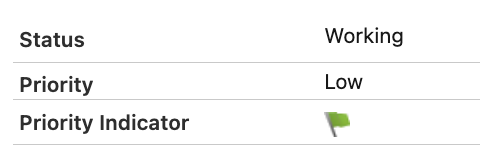
Here is a simple text formula field that shows different colored flags based on the priority of the Case record.
CASE(TEXT(Priority),
'High', IMAGE('/img/samples/flag_red.gif', 'High'),
'Medium', IMAGE('/img/samples/flag_yellow.gif', 'Medium'),
'Low', IMAGE('/img/samples/flag_green.gif', 'Low'),
''
)
Considerations and Best Practices
Using these built-in classic Salesforce icons in formula fields is a great "zero setup" shortcut. However, these image paths aren't an officially supported API. Therefore, Salesforce can rename, move, or retire specific icons in a future release. For anything business-critical (or for managed packages), the best practice is to copy the icons you rely on into a Static Resource (or use a small LWC with SLDS icons) so you fully control availability and styling. If you do use /img icons, keep them limited to simple UI indicators, document the exact paths you depend on, and be prepared to swap them out if a release ever changes an asset.
Leave a Reply