

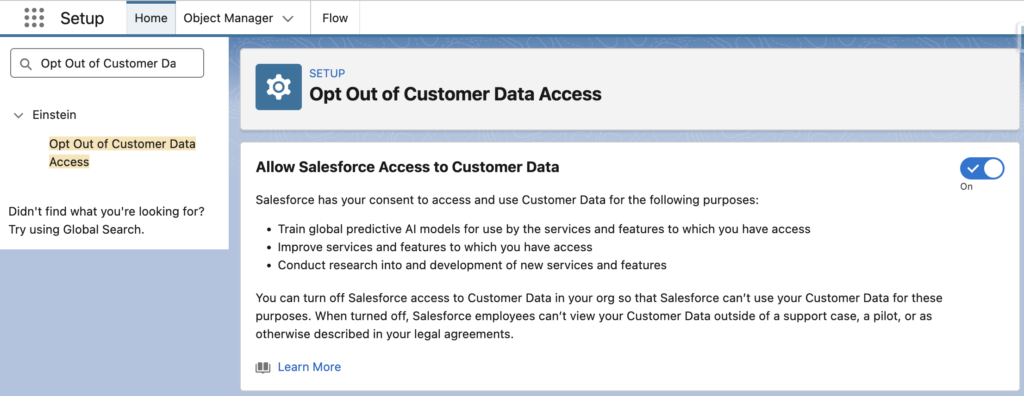
Recently, many people in the Salesforce ecosystem have been talking about a setting in Setup called Opt Out of Customer Data Access. The main concern is that Allow Salesforce Access to Customer Data toggle appears to be enabled by default. This has caused admins, architects, and security teams to question what it means for their orgs and customer data.
What Allow Salesforce Access to Customer Data Toggle Means
This setting is related to whether Salesforce can use anonymized customer data for purposes such as research, product improvement, and AI model development. It does not mean that someone at Salesforce is casually opening your records or reading your customer data. However, it deserves attention, especially if your org contains sensitive, regulated, or confidential information. The key point is not to panic, but to understand what the setting allows, review it with the right stakeholders, and make an intentional decision instead of relying on the default.
Is It New? Not Really
This setting may feel new because people are now seeing the Allow Salesforce Access to Customer Data toggle in Setup. However, the concept itself is not new. Salesforce has had an opt-out process for using customer data in global models for years. The difference is that previously, opting out was typically handled through a Salesforce support case. Now, the setting is more visible and easier to manage directly from Setup.
That visibility is probably why it suddenly became a hot topic. The concern is valid, but it is less about a brand-new policy and more about a long-existing topic becoming easier to notice, review, and control.
Wrapping Up
This setting is relevant for Salesforce orgs that use Einstein features. It may not be a brand new topic, but now that the toggle is visible in Setup, it is much easier for admins and architects to review it.
The main takeaway is simple: don't ignore the default. Check the setting, understand what it means for your org, and review it with your legal, security, and business stakeholders. Whether you leave it enabled or turn it off, it should be an intentional decision.
Leave a Reply