

Salesforce is enforcing email domain verification for user-authored emails. This means that emails sent from Salesforce must use a verified domain, either through DKIM or an Authorized Email Domain. If the domain is not verified, Salesforce may not deliver the email. This applies to emails sent from Salesforce, including emails triggered by automation such as Flow and Apex. In production, this requirement makes sense. You usually send emails from your company domain, and verifying that domain is an important step for email security and deliverability. However, sandboxes create a different challenge.
The Problem in Sandboxes
Many Salesforce orgs have multiple sandboxes. For example, you may have developer, partial copy and full copy sandboxes. Technically, you can configure DKIM in each sandbox. But in practice, this can become hard to maintain.
Each sandbox may require its own DKIM setup. If you have several sandboxes, you may not want to add all of them to your DNS configuration.
There is also another issue: sandbox refreshes.
Refreshing sandboxes is a good practice. Many companies refresh their sandboxes every few months to keep them aligned with production. However, when you refresh a sandbox, the DKIM configuration does not stay there. You need to configure it again. That means this is not a one-time setup.
What Happens If You Don't Configure It?
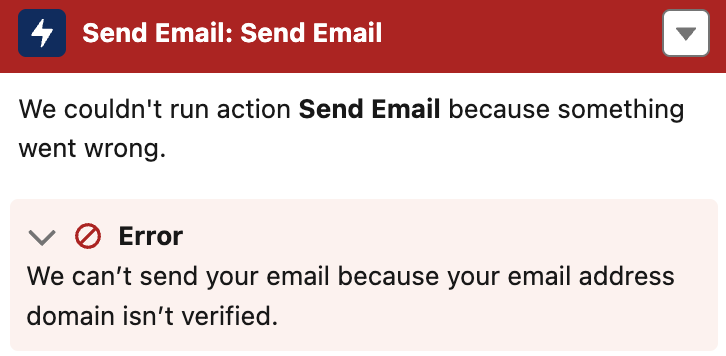
If your sandbox does not have a verified sending domain, emails can fail.
This can impact:
- Apex email sends
- Flow email alerts or Send Email actions
- Automations that send user-authored emails
- Test classes that send emails
The last point is especially important. If you have test classes that send emails, they may fail. This can block deployments, even though the issue is not directly related to your code. So, while DKIM enforcement is important, it can create unnecessary maintenance work in sandbox environments.
The Workaround: Use a Substitute Email Address
Salesforce provides a setting that can help with this. In Setup, go to Deliverability and enable: Use a substitute email address for unverified domains.
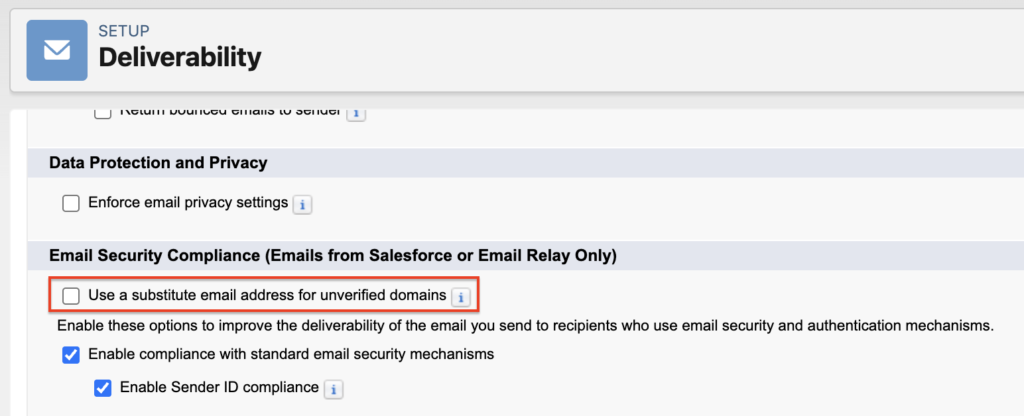
Salesforce's documentation explains that this setting allows users with verified email addresses to send emails even when their domain is not verified. In that case, Salesforce uses a substitute From address instead of the user's unverified domain.
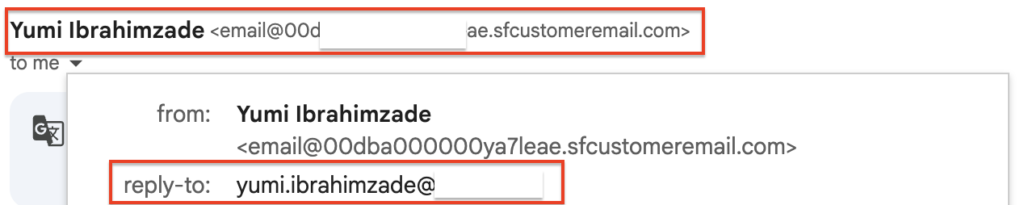
The From address will look like this: email@{UniqueId}.sfcustomeremail.com
However, this doesn't mean the recipient sees a random sender name. The recipient still sees the correct sender name, and when they reply, the reply goes to the user's actual email address.
So from the recipient's point of view, the email still behaves correctly.
Why This is Useful for Sandboxes
This setting is very useful for sandbox environments where you do not want to configure DKIM for every sandbox. Instead of adding DNS records for each sandbox and repeating the setup after every refresh, you can enable the substitute email address setting in Deliverability.
This helps avoid issues where Flow, Apex, or test classes fail because the sending domain is not verified.
Of course, this does not replace a proper DKIM setup in production. In production, you should verify the domains that your organization uses to send emails. Salesforce recommends verifying domains using DKIM or Authorized Email Domains to avoid disruption.
But for sandboxes, this setting can save a lot of unnecessary maintenance.
Also Useful for Experience Cloud Users
This setting can also be useful when you have external Experience Cloud users. In many Experience Cloud scenarios, users may have email addresses from many different domains. You cannot realistically configure DKIM for every possible external domain. You do not own those domains, so you cannot verify them with DKIM.
Using a substitute email address helps Salesforce send the email without requiring every external user's domain to be verified.
Important Reminder
This setting is not a reason to ignore DKIM completely. For your own company domains, especially in production, you should still configure DKIM or Authorized Email Domains. This is important for security, deliverability, and compliance with Salesforce's email-sending domain verification requirements.
But for sandboxes and external users with domains you do not control, enabling Use a substitute email address for unverified domains can be a practical solution.
Final Thoughts
Salesforce's email domain verification requirement improves security and helps prevent spoofing. However, sandbox environments are different from production environments.
If you have multiple Salesforce sandboxes and refresh them regularly, configuring DKIM again and again can become painful. Even worse, missing DKIM configuration can break Apex, Flow, and test classes that send emails.
For Salesforce sandboxes, enabling Use a substitute email address for unverified domains is a simple and practical workaround. It helps keep your automations and deployments working without requiring you to maintain DKIM records for every sandbox.
Leave a Reply