
Salesforce Flow is a powerful automation tool, but like any tool, it can sometimes throw errors. Some are easy to understand, while others can be confusing if you are not familiar with how Salesforce transactions work. One of the most common errors is MIXED_DML_OPERATION. Let's see why and when it happens, and how to fix it.
What is MIXED_DML_OPERATION Error and Why Does It Happen?
In Salesforce, setup objects are records related to configuration and access, such as PermissionSetAssignment, or GroupMember. Non-setup objects are regular objects like Account, Contact, Case, or Opportunity.
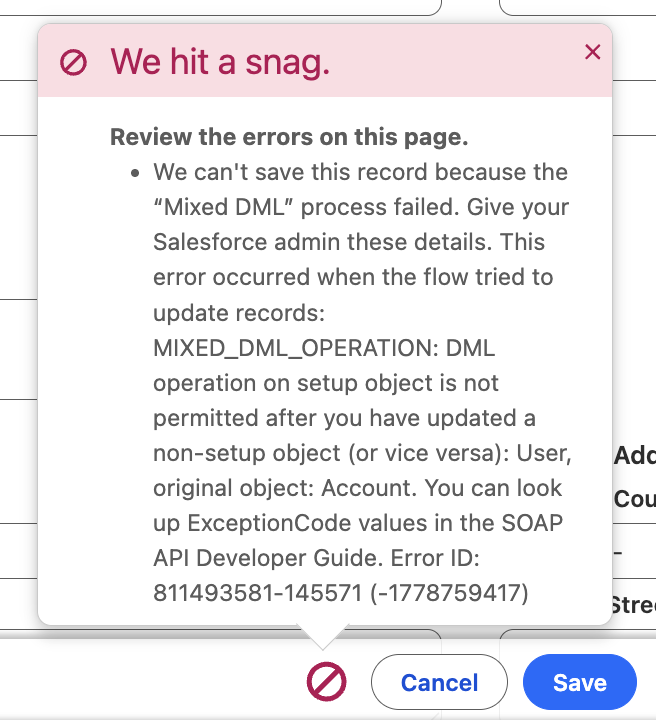
MIXED_DML_OPERATION error happens when the same transaction tries to make changes to both setup objects and non-setup objects. Salesforce blocks this because changes to setup data can affect access and security, so they are handled differently from normal business data. When a flow tries to update both types in one transaction, Salesforce throws the MIXED_DML_OPERATION error. It is important to note that this is not a Flow specific issue, but a general Salesforce platform limitation. It applies whenever you update setup and non-setup objects in the same transaction.
Different Ways to Fix MIXED_DML_OPERATION Error in Salesforce Flow
The key to fixing MIXED_DML_OPERATION is to make sure the setup object update and the non-setup object update do not happen in the same transaction. In other words, the solution is to split the process into separate transactions. The way you do that depends on the type of Flow you are working with, since each Flow type provides different options for creating separate transactions.
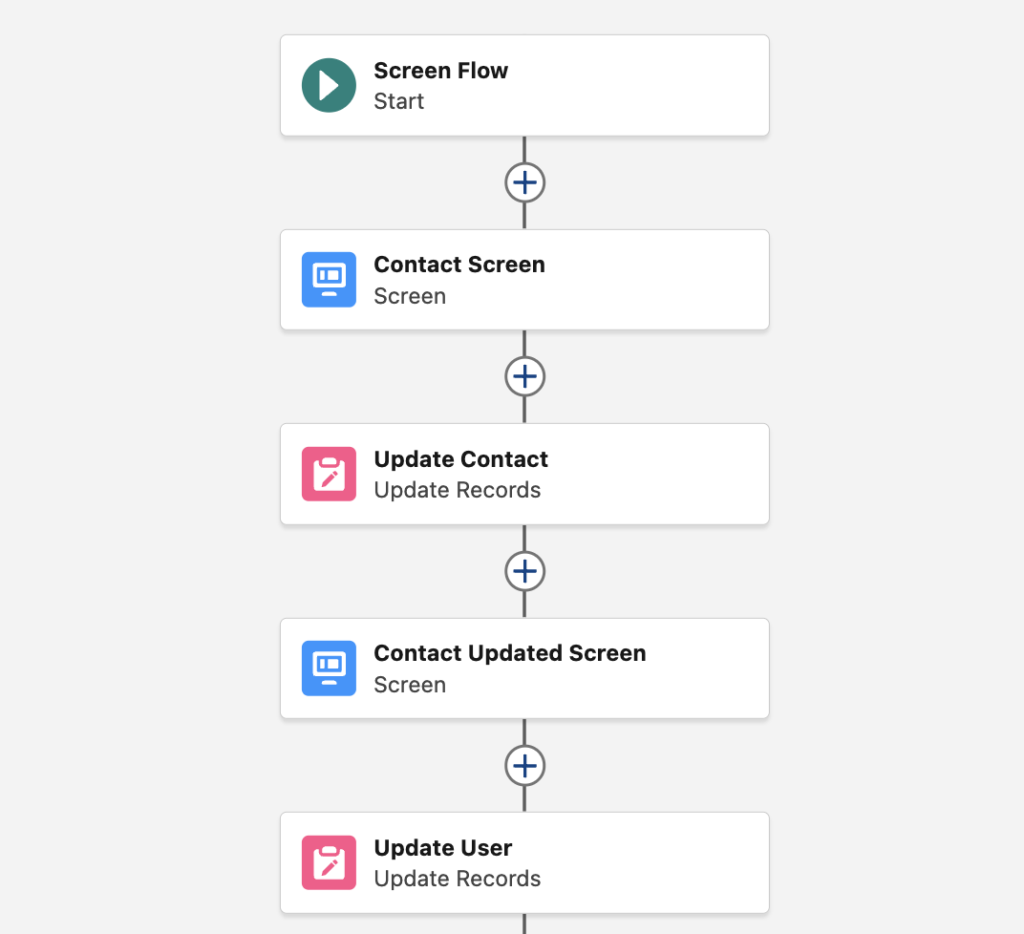
Let's look at a simple example: a Flow needs to deactivate a User and then update the related Contact. Depending on the type of Flow, let’s see how you can handle this.
Screen Flow
The solution is to separate the two DML operations so they do not run as part of the same transaction. After the first record update or creation, you need to place a Screen element or a Local Action before the second DML runs. These elements end the current transaction, so the next part of the flow runs in a new one. This makes it possible to keep the setup object change and the non-setup object change apart and avoid the MIXED_DML_OPERATION error.
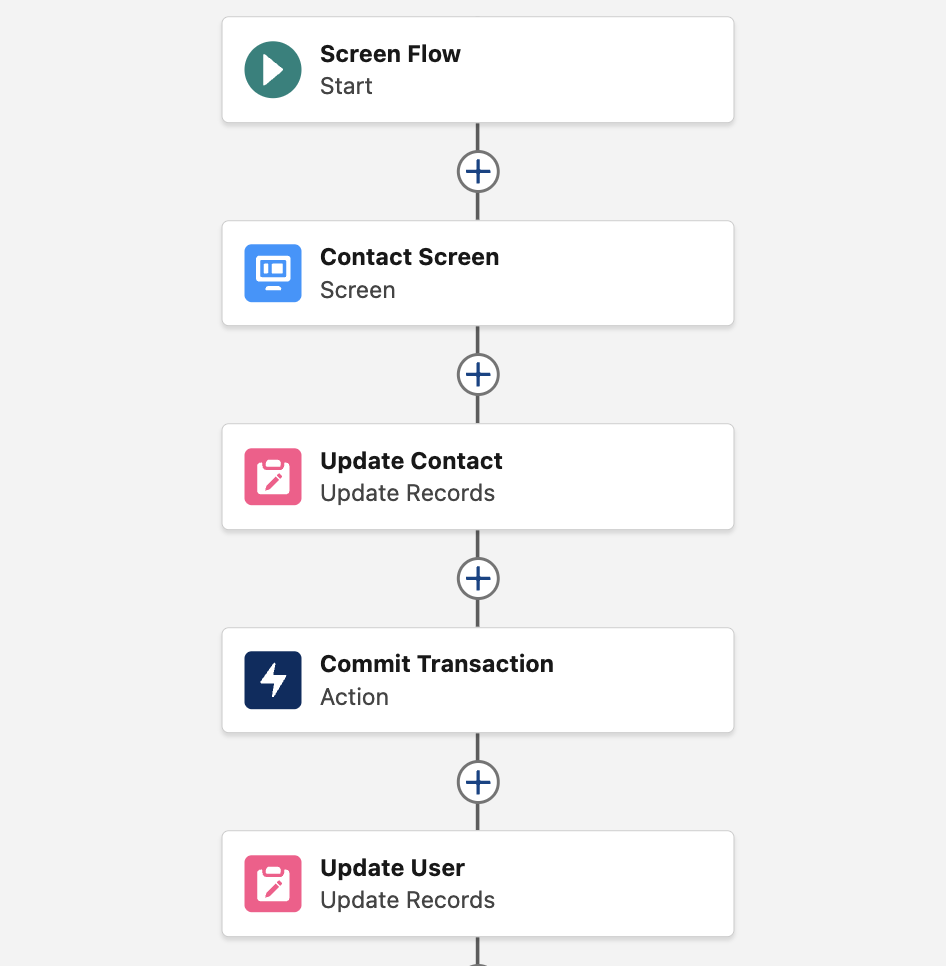
Displaying a screen between the two DML operations (update elements) may not be the best user experience. In that case, you can use a local action that doesn't do anything. For example, you can use the Commit Transaction action from UnofficialSF. It ends the current transaction and allows the rest of the flow to continue in a new one, which helps avoid the MIXED_DML_OPERATION error in a Screen Flow.
Record-Triggered Flow
In a Record-Triggered Flow, the approach is different because there is no screen or local action you can use between the two DML operations. To solve the MIXED_DML_OPERATION error, you need to move one part of the logic to a separate path that runs later. You can do that using an Asynchronous Path or a Scheduled Path. This way, the setup and the non-setup object change do not run together, which avoids the error.
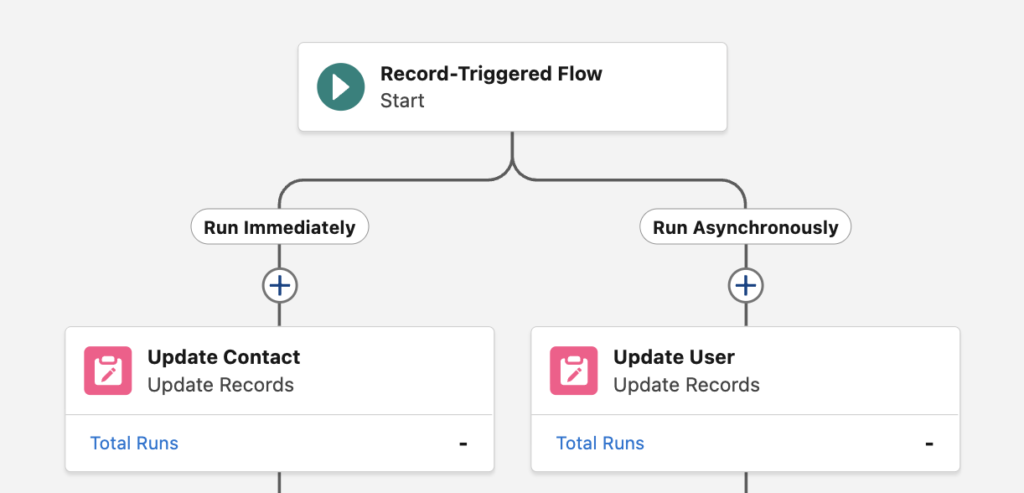
This Flow is triggered when an Account is updated. It then updates Contact and User records. Since the transaction starts with the Account update, the User update cannot happen in the same transaction, so the Flow performs this in the Asynchronous Path.
It is important to note that simply splitting the logic into two different Flows does not solve the problem. The same applies to moving part of the logic into a Subflow. Even though the actions may be distributed across multiple Flows, they still run as part of the same transaction if one Flow directly calls the other or if they are triggered within the same execution context. Because of that, the MIXED_DML_OPERATION error can still occur. To avoid it, the two parts must run in separate transactions, not just in separate Flows.
Scheduled or Autolaunched Flow
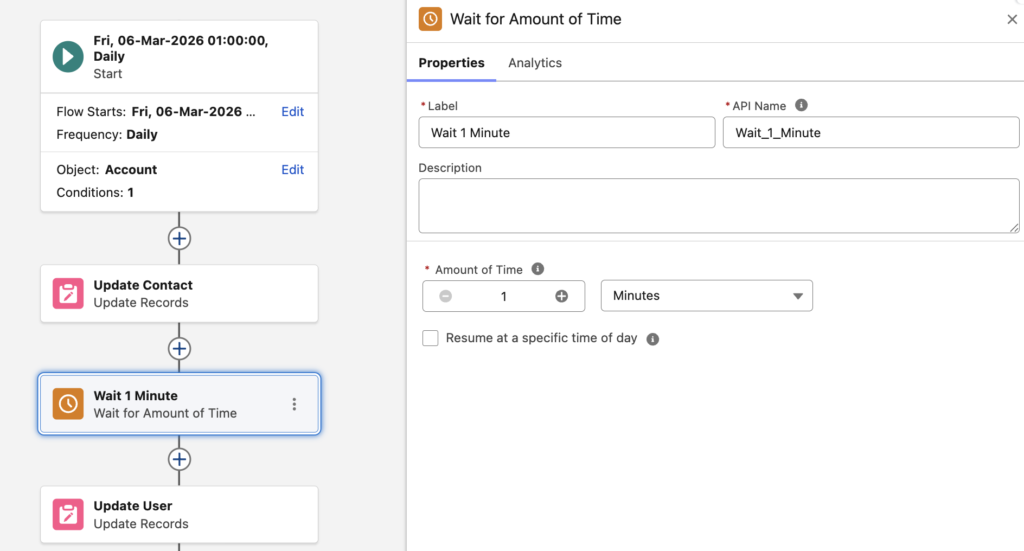
In a Scheduled Flow or Autolaunched Flow, you do not have screens, local actions, or separate paths like you have in Record-Triggered Flows. In this case, the way to separate the two DML operations is to use a Wait element. The Wait element stops the flow and ends the current transaction. When the flow resumes, it continues in a new transaction, which allows you to keep the setup and non-setup object change apart and avoid the MIXED_DML_OPERATION error.
Using a Platform Event to Solve the MIXED_DML_OPERATION Error
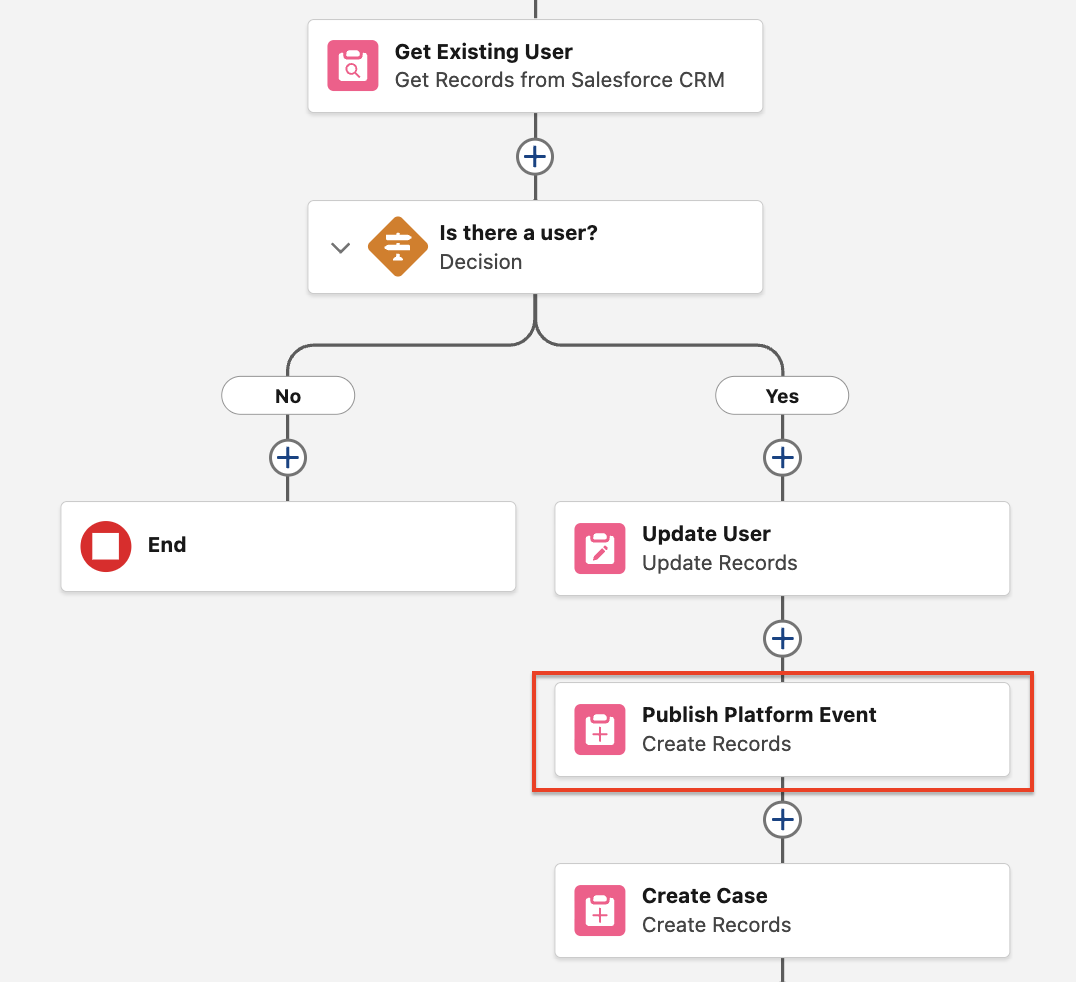
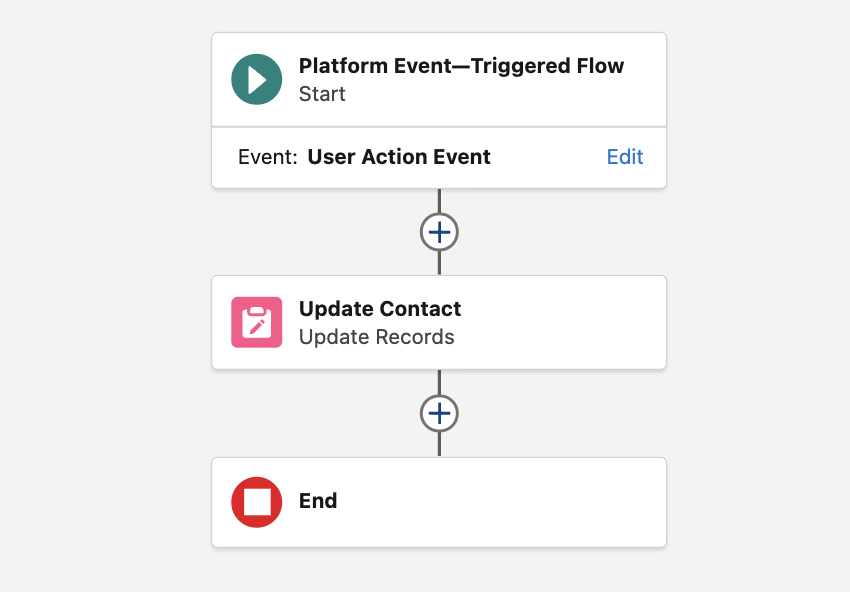
Another way to solve the MIXED_DML_OPERATION error is to use a Platform Event. In this approach, the Flow performs the first part of the logic and then publishes a Platform Event instead of continuing with the second DML operation. The process can then continue in a Platform Event-Triggered Flow. Since Platform Event-Triggered Flow runs separately, it continues in a new transaction. This approach can be especially useful in a long Record-Triggered Flow, where you may need to perform mixed DML actions as part of the overall process but cannot use separate paths because of Flow limitations. In that case, publishing a Platform Event allows you to continue the logic in a new transaction and avoid the error.
In this example, the first record-triggered flow updates the User and then publishes (creates) a platform event.
Then a Platform Event-Triggered Flow runs and updates the Contact record.
Leave a Reply